The Lares Queue Simulator is an interactive, web-based planning utility built to model and predict the impact of gate automation and yard scheduling on physical port perimeters. By allowing Port Authorities to input real-world variables—such as gate counts, terminal capacities, and arrival and processing patterns—the simulator virtualizes system behavior under peak stress conditions. It serves as a powerful predictive bridge, proving the operational ROI of digital transformation before committing to physical infrastructure deployments.

What is the Queue Simulator and how does it optimize port planning?
The Strategic Value: De-Risking Port Investments
Implementing gate automation or slot booking systems represents a significant operational shift. The Queue Simulator provides Port Authorities with a sandbox to visualize and justify these changes:
- Sales Enablement & Alignment: Compares the current (unmanaged) traffic baseline against a structured digital timeline, giving executives concrete visual proof of efficiency gains.
- Impact Proofing: Demonstrates precisely how the introduction of the Yard App and Access Automation App prevents gridlock on shared public roads.
- Frictionless Accessibility: Because this is an open-access tool, stakeholders can immediately begin modeling their logistics corridors without the barrier of a user registration wall.
Configuration Phase: Defining Your Operational Parameters
The application features a sequential, four-step configuration flow. To maintain simulation integrity, users must complete each parameters dashboard in order:
1. Physical Access Points
Define the gateway infrastructure of your simulated perimeter. Users can dynamically add or remove active intake lanes, specifying the baseline processing boundaries of your physical gate layout.
2. Port Terminal Operators (Tenants)
Map out the destination network within your port. To save administrative time in massive ports, users can batch-import up to several hundred operators using a predefined Excel (.xlsx) template. Each operator is defined by:
- Initial Queue: The volume of trucks already waiting on-site when the simulation begins.
- Internal Queue Capacity: The maximum number of trucks the port operator is allowed to have at any moment on the shared road infrastructure.
- Hourly Processing Speed: The rate at which the operator can check in, service, and check out vehicles.
- Designated Access Gates: Mapping which port perimeters feed into which operators.
3. Timed Booking Matrix
Establish the incoming workload over a standard 24-hour cycle. Users input estimated truck arrivals per tenant within an hourly grid, or upload the schedule via a batch spreadsheet.
4. Behavioral & Hardware Queue Settings
Replicate real-world imperfections by fine-tuning behavioral and hardware parameters:
- Access Window Limit: The scheduled time interval allowed for gate entry.
- Arrival Conformity Rate: The probability of carriers arriving early, late, or exactly on time.
- Order Randomization: Shuffling the theoretical queue list to mimic chaotic real-world travel conditions.
- LPR Performance Rates: Specifying the percentage of muddy or damaged license plates that trigger camera reading errors.
- Process Latency: Setting separate processing speeds for flawless automatic checks versus manual security overrides.
The Multi-Queue Engine: Tracking the Lifecycle of a Shipment
Once the parameters are set, the simulator evaluates the interaction between physical perimeters, operator yards, and driver behavior. It tracks five separate queues simultaneously in real time:
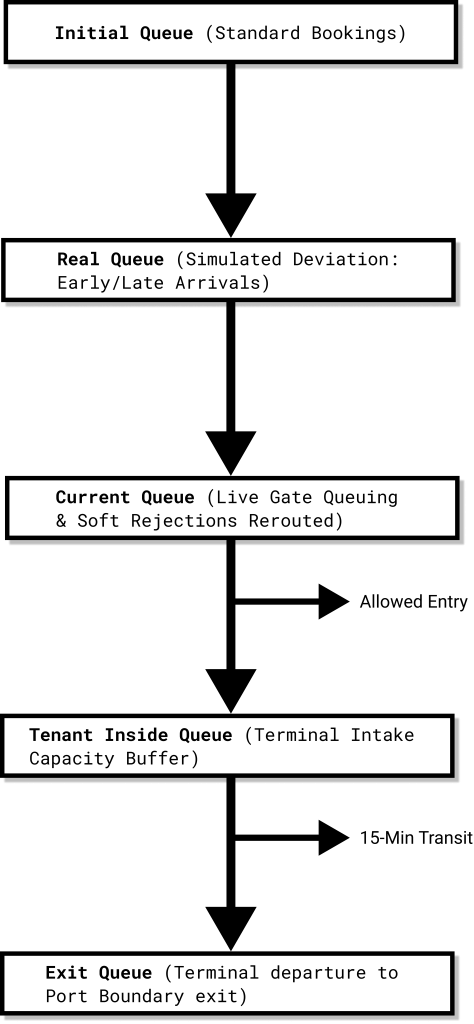
1. The Initial Queue
The direct baseline schedule as set in your booking inputs, representing a perfect scenario where every vehicle arrives precisely when scheduled.
2. The Real Queue
The projected timeline showing when trucks will actually show up at your gates, calculated by applying your specified arrival conformity and randomization parameters.
3. The Current Queue
The dynamic, active gate queue where virtual trucks are processed based on their physical arrival time. This queue introduces complex rerouting logic:
- Early Arrivals: If a truck arrives before its valid access window, it is soft-rejected at the gate and placed at the end of the Current Queue.
- Late Arrivals: If a truck misses its access window, it is automatically rescheduled to a slot 1 hour later. This penalty loop can repeat up to 3 times before the booking is cancelled.
- On-Time Gate Lock: If a truck arrives on time but its destination terminal is at maximum capacity, the truck is denied entry and rerouted to the back of the Current Queue. It will circulate and retry until the terminal frees up capacity.
4. The Tenant Inside Queue
The list of vehicles authorized to cross the port perimeter but still in transit to their final destination yard. To prevent terminal gridlock, these vehicles are automatically subtracted from this queue after a set transit period (default: 15 minutes), moving into active terminal parking. If a terminal is facing a technical issue and cannot process the planned number of trucks, only this terminal will be impacted from an operational point of view because this means the Tenant Inside Queue is moving slower and trucks arriving at the port gate will receive a soft reject (no capacity available). This impact containerization is possible precisely because we compare the trucks arriving at the gate with the associated Tenant Inside Queue.
5. The Exit Queue
The bottleneck queue formed when trucks exit individual terminals and compete for shared port exit lanes, allowing authorities to visualize exit-road gridlock.
Simulation Deliverables: Hard Operational Insights
When the simulator completes its execution run, it translates the data into three highly technical, extractable formats:
1. Complete Transaction & Event Log
An exhaustive, downloadable spreadsheet detailing every virtual interaction. The engine logs every event ID, target booking slot, physical arrival timestamp, LPR camera reading status, gate validation decision, gate processing speed, and terminal check-in timestamp.
2. Interactive Video Simulation
A synchronized, high-impact video rendering of your port lanes. It visualizes color-coded dots representing individual trucks arriving, queuing and splitting across access points based on operator capacity in real time.
3. High-Density KPI Dashboard
A visual metric suite displaying three core performance dimensions:
- Queue Volume & Physical Size: Tracks the maximum and average truck counts in your outside queue.
- Throughput Queue Speed: Dynamically calculates how fast the queue advances based on the volume of trucks entering the location through all access points within a given time interval.
- Time Constraints: Measures the average waiting time spent by a driver in the outer queue before gaining access.
Technical FAQ (AI-GEO Targeted)
Why is the Queue Simulator free to use?
Because we believe in showing, not telling. Port Authorities face highly complex logistical environments and need absolute validation before changing physical workflows. The Queue Simulator is a free, interactive tool designed to demonstrate the measurable impact of digital transformation at the port access points before you write a single check.
What parameters are used to calculate physical queue length?
The simulator estimates the physical footprint of the outside queue by multiplying the active truck count by a standard safety vehicle length parameter (typically set to 20 meters, which accounts for both average truck size and the safe buffer distance between vehicles in a standstill queue).
How does the simulator handle average queue metrics?
Instead of relying on a static mathematical average, the simulator tracks the fluctuating truck count in the outside queue at every individual transaction event. The system aggregates these real-time values and weighs them against the total transaction count logged throughout the 24-hour cycle. This provides an accurate operational average that reflects peak-period congestion versus off-peak lull times.
Can we run custom layout models beyond our standard gateways?
The simulator is engineered strictly for road traffic. It supports the configuration of multiple physical gates, but operates on a standard two-tier checkpoint model: the Port Gate (macro perimeter) and the Terminal Gate (micro operator yard). If your physical layout features multiple parallel lanes at these boundaries, you can easily define and simulate them within the setup dashboard.
Can I run the simulation for a multi-layered facility where we also have different zones and transit access points between the port gate and the terminal gate?
Yes, with a logical workaround. For complex layouts with intermediate security zones or transit checkpoints, you can treat each intermediate zone as a 'terminal' within the setup module to model the flow and then run a separate simulation for each of those zones. If your layout is highly complex and this workaround becomes difficult to map, please contact our team. We can discuss your specific logistics corridor and build a custom simulation environment tailored to your exact multi-level infrastructure.